Use your resources wisely.
14 AI agents that work through Canvas, answer your email, turn lectures into notes, schedule your Zooms and plan your week around every deadline. You just show up. Exams stay yours.
First 10 days free, cancel anytime. Save with a semester plan, or own it for $89.99.
Buying for a fraternity or sorority? Chapter pricing →
Demo with simulated screens. Email and invites go out on the rules you set. Assignments are turned in after one tap from you, and drafted only where your course allows AI.
14 named agents. Tap one to see what it does.
You talk to HELM. HELM hands each job to the right department, checks the work and only bothers you when something actually needs you.
Watch the whole crew work.
This is the real StudentOS Command Center, version 1.7, loaded with a sample student. Open it and you see three things: what needs you, what's next, and what's already done. One big bar to ask HELM. Preview any draft word for word before you approve it. Flip to Everything to watch all 56 agents.
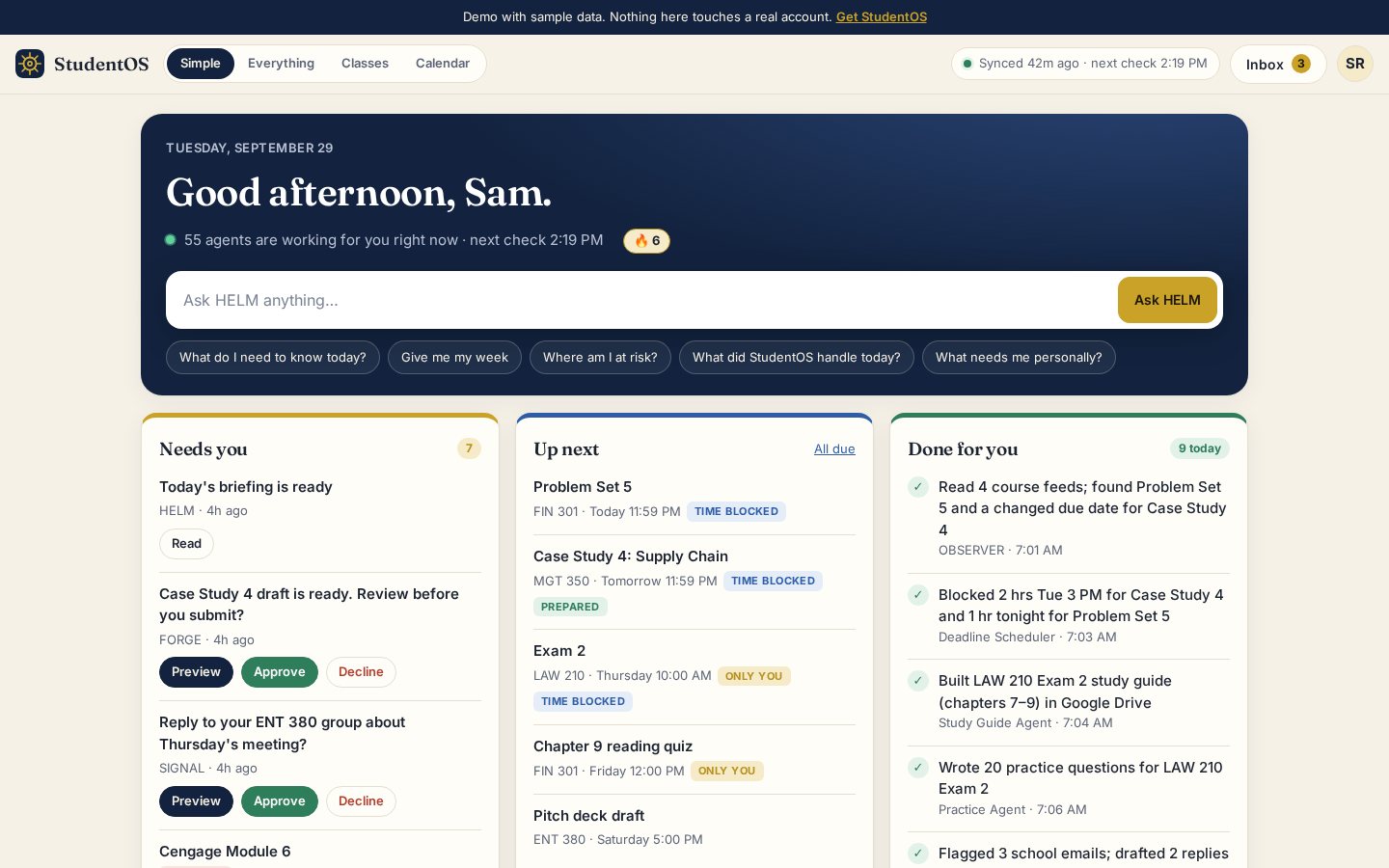
One big bar. Ask what's due, or give it a job and watch the right agent pick it up.
Your briefing and anything waiting on your OK. Preview the exact text, then Approve, Request changes or Decline.
Your next deadlines, quizzes marked Only You, and time already blocked on your calendar.
What the crew handled today, in plain English. Flip to Everything for all 56 agents and the full log.
The same Command Center members open in any browser at app.autonomousstudent.com, shown here with a sample student. Every kit includes HELM, the daily briefing and the Action Ledger.
Three steps. Then it runs.
About 5 minutes on a computer, right after you check out. Your AI does the thinking; StudentOS keeps the record. Watch the 2-minute setup video →
1Add StudentOS to ChatGPT or Claude. One link, pasted once: Settings → Plugins → Create MCP app in ChatGPT, or Settings → Connectors in Claude. Sign in with the email you checked out with.
2Connect Canvas. Make an access token in your Canvas settings and paste it into your Command Center. Your crew then works from your real assignments, rubrics and grades.
3Say “Deploy my HELM Command Center.” Your crew sets itself up and runs on a schedule. Email goes out on your rules; assignments go in after one tap from you.
Your crew goes where your AI goes.
It lives in your Claude or ChatGPT.Once it's connected, your agents aren't stuck on this site. Open either app on any day and just ask: “What's due this week?” or “Pull up my discussion prompt and help me draft it.” With Canvas connected, it already knows your classes.
If something stalls, ask it directly.AI tools have built-in limits, so now and then a task won't run from your Command Center. Open Claude or ChatGPT with StudentOS connected and ask for the same thing there. Name the class, the assignment and what you want: an outline, a draft, a study guide, feedback.
Straight talk: it won't do everything.Quizzes, tests and exams stay yours, and your AI may turn down other things too. Anything that goes in under your name, you review first. What it does is cut the hours around the work.
Links to ChatGPT Plus or higher, or to Claude on any plan (free included). Runs on its own with Claude Pro or ChatGPT Plus, billed by Anthropic or OpenAI, not us. Every plan sets up the same way. Step-by-step setup guide · Details
What you get.
Opens the minute you check out, in any browser. Setup walks you through it one screen at a time.
Walks you through connecting your apps and switches the crew on.
Step by step, for whichever one you use.
On either plan, every new version and new agent lands in your kit the day it ships.
Every action is sorted: AUTO, REVIEW, STUDENT REQUIRED or BLOCKED.
Blocks quiz and exam autopilot. No override.
What you can — and can't — do with it.
One person, one seat. Sharing it — with classmates, a shared drive, anywhere — isn't covered, even if no money changes hands.
Fraternity or sorority? Get the whole chapter covered on a Chapter license: one flat price a semester, a seat for every member.
Before you buy.
How do I set it up?+
What exactly do I get?+
Does it work with Outlook, Gmail and Zoom?+
My school uses Blackboard, not Canvas.+
Which plan should I pick?+
Why monthly?+
How does the free trial work?+
How do I cancel the monthly plan?+
Which email should I use?+
Need a paid plan?+
Will it send or submit stuff without asking?+
What if it won't do something?+
Can my fraternity or sorority buy it for everyone?+
Can I share my copy?+
How fast do I get it?+
Ready to put a crew on it?
Already a member? Sign in to your Command Center · Setup guide.
Try it free for 10 days. You won't be charged until day 10. Cancel before then and you pay nothing.
- Your Command Center, open right after checkout
- Every update and new agent, the day it ships
- Cancel anytime, in two clicks
Why monthly? StudentOS keeps getting better. Every update I ship lands in your kit automatically, so you keep plugging in the newest agents and integrations.
10 days free, then $43.99 for 4 months. Works out to $11.00 a month. Renews every 4 months until you cancel; cancel before day 10 and you pay nothing.
- Everything in the monthly plan: the full kit and your Command Center
- Every update and new agent, the day it ships
- Cancel anytime; you keep access through the end of your 4 months
Pay once. No subscription, nothing to cancel, nothing to renew.
- Everything in the subscription plans: the full kit and your Command Center
- Every update and new agent, the day it ships
- Never charged again
Every brother gets his own seat. One flat price per semester for the chapter, set by how many of you there are. The bigger the chapter, the lower the per-person rate.
- A seat and Command Center for every member, no shared logins
- Every update and new agent, the day it ships
- One invoice a semester to the chapter, not 60 separate cards
Talk pricing directly. Have your rough headcount ready and you'll get a quote on the call.
Call for a quoteSend your chapter, school and rough headcount, and you'll get a time for a 15-minute demo with your exec board.
Email to book a demo1Call or email with your headcount. You get a number on the spot, not a form and a wait.
215-minute demo for your exec board. Watch it run on a real class before anyone commits.
3One invoice a semester. Every brother gets his own seat the same week.
No card, nothing to sign until you've seen it work.
Before you check out: use the email you'll sign in with (personal is best). Using ChatGPT? Linking needs ChatGPT Plus or higher. Using Claude? Any plan works, free included.
Free for 10 days, then $12.99/month plus tax, billed monthly until you cancel. Cancel anytime in your billing portal; cancel before day 10 and you pay nothing. You land in your Command Center right after checkout.
Already subscribed? Manage or cancel